Flash Tool Setting
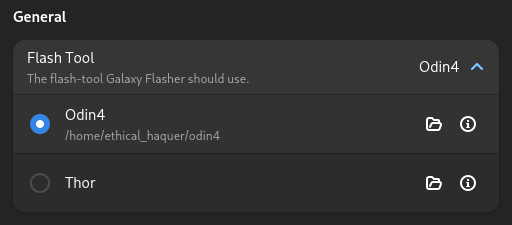
The options are:
Odin4 - A proprietary, official Samsung flash-tool that was leaked.
Thor - An open-source flash-tool. The last update was over a year ago, sadly.
To set what flash-tool to use:
Click on the “info” icon (looks like an “i” in a circle) of the flash-tool you want to use.
You will be shown some info about the flash-tool, including where to download it from. Download the file if you don’t already have it.
Click on one of the flash-tools to select it (you can click anywhere on the row, as long as you don’t click the two icons on the right). If you haven’t already set what file to use, you will be prompted to select the executable file to use (the file you downloaded earlier, or the one you already had).
Now that you have changed the flash-tool setting, Galaxy Flasher will attempt to switch to the new tool. If it fails, the Select Files Button will be greyed-out on the Start Page. If the button is greyed-out, feel free to let me know on XDA or Codeberg!
Keep in mind that the process for flashing files is slightly different between flash-tools.